
Download Extensoft Screen Capturer – screen capture, video recording, screenshot tool, productivity app, Windows utility
Overview
Extensoft Screen Capturer is a straightforward utility designed for users seeking an efficient way to capture screenshots and record screen activity on Windows systems. The application serves as a reliable tool for creating visual content, particularly useful for educators, content creators, and professionals who need to document software processes, develop tutorials, or share visual information. By offering both static and dynamic capture capabilities, it addresses the common need for quick, accurate screen documentation without requiring complex workflows.
Targeted primarily at individuals and teams using Windows devices, the app supports a range of practical scenarios such as recording software demonstrations, capturing error messages, or producing step-by-step guides. Its simple interface and minimal learning curve make it accessible to users of varying technical skill levels. While the developer, Extensoft, is not elaborated upon in detail, the app’s longevity since its release on February 17, 2010, suggests a stable and enduring presence in the productivity software space.
Within the broader Windows utility ecosystem, Extensoft Screen Capturer occupies a niche focused on lightweight, no-frills screen capture functionality. It does not rely on cloud integration or subscription models, aligning with users who prefer standalone tools. The app’s continued availability as a free download underscores its role as a practical, accessible solution for everyday screen capture needs.
Key Features & Functionality
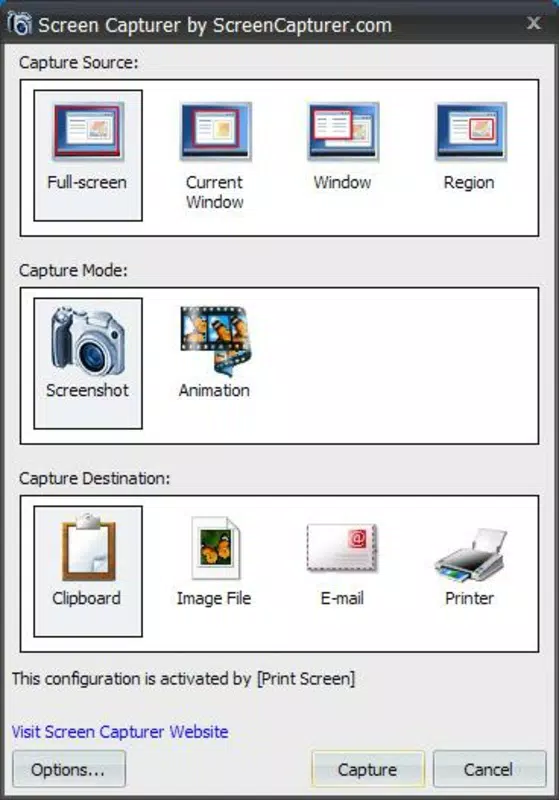
- Flexible Capture Options: Users can select full-screen capture, rectangular region selection, or active window capture. This allows precise control over what is recorded or saved, ideal for isolating specific application windows during tutorials or troubleshooting sessions.
- Video Recording Capability: The app supports recording screen activity in WMV and AVI formats, enabling users to produce high-quality video content for presentations or online sharing. These formats are widely compatible with media players and editing software.
- Multiple Format Support: Screenshots can be saved in JPG, PNG, GIF, TIFF, or BMP formats. This flexibility ensures users can choose the best format based on their intended use—PNG for transparency and clarity, GIF for simple animations, or BMP for archival purposes.
- Instant Sharing Options: Captured images can be sent directly via email or printed without being saved to a file. This feature streamlines workflows for users who need to share visual data quickly, especially in collaborative or support environments.
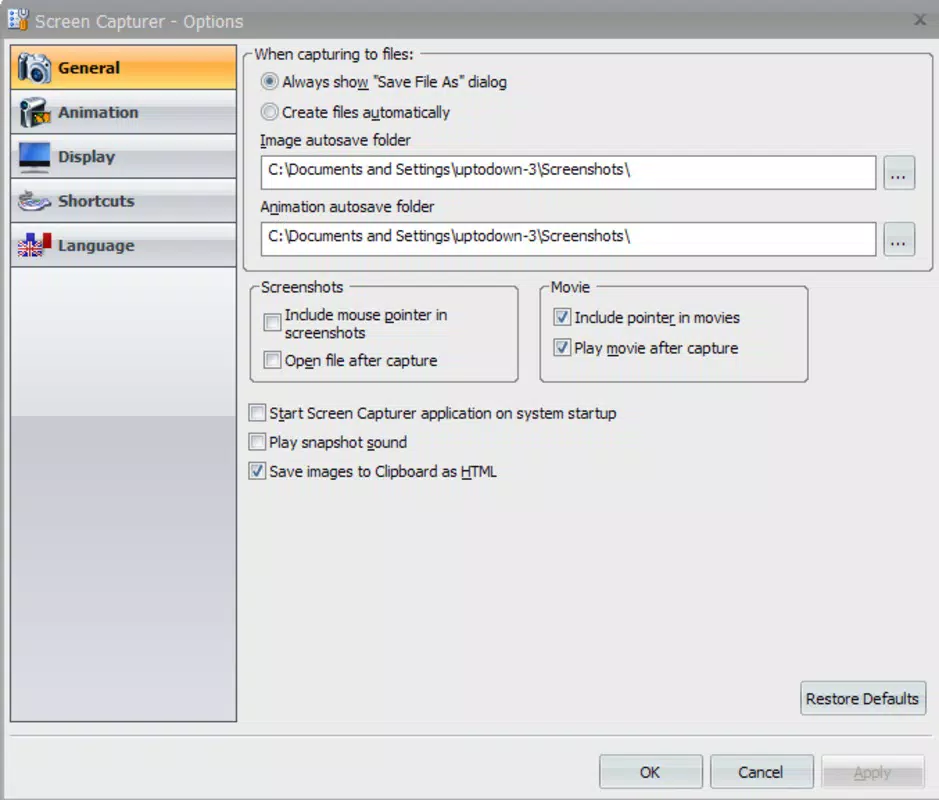
- Customizable Hotkeys: The ability to assign and modify keyboard shortcuts enhances accessibility and efficiency. Users can trigger capture functions with a single key combination, reducing time spent navigating menus.
For example, a teacher creating a video guide for students can use the rectangular capture to focus on a specific software panel, record the session in AVI, and then instantly email the resulting file. Similarly, a technical support agent might use the active window capture with a custom hotkey to document a bug and send it directly to a colleague.
Interface, UX & Performance
The interface of Extensoft Screen Capturer is designed with simplicity in mind, featuring a minimal layout that prioritizes functionality over visual complexity. Navigation is intuitive, with clearly labeled options for capture type, format selection, and output preferences. The absence of cluttered menus or excessive toolbars contributes to a streamlined user experience.
Users can expect consistent performance across various Windows device categories, from older desktops to modern laptops. Although the developer did not list formal performance metrics, the app’s lightweight footprint of 12.5 MB suggests efficient resource usage. This makes it suitable for systems with limited processing power or memory.
Responsiveness is generally smooth during both capture and playback operations. The app maintains stability during recording sessions, with no reported crashes or freezes in standard usage. However, specific requirements for hardware acceleration or GPU support were not disclosed. The developer did not specify minimum OS requirements, but its release date in 2010 indicates compatibility with a wide range of Windows versions, including legacy systems.
Platform Compatibility & Technical Requirements
Extensoft Screen Capturer is designed exclusively for the Windows platform. It is compatible with various Windows operating systems, though specific version details were not provided by the developer. The application has a file size of 12.5 MB, making it a lightweight download suitable for quick installation on devices with limited storage.
The software version is listed as 1.0.0.1, indicating a stable release with minimal updates since its initial launch. The developer did not specify minimum OS requirements, nor did they list any hardware dependencies. As such, users should consider testing the app on their system to confirm compatibility, especially on newer Windows versions.
Pros and Cons
Pros
- Free to download and use with no hidden costs
- Lightweight size (12.5 MB) ensures fast installation
- Supports multiple capture formats for screenshots and video
- Customizable hotkeys for quick access to functions
- Direct sharing via email or print without saving files
Cons
- Developer did not provide detailed system requirements
- No information on compatibility with newer Windows versions
- Limited to Windows platform; not available on mobile or macOS
- Video formats (WMV, AVI) may require additional codecs for playback
- No cloud storage or automatic backup features
FAQ
Is Extensoft Screen Capturer safe to download?
Yes, the app is available as a free download from trusted sources. It does not include malware or adware based on available information.
Can I use Extensoft Screen Capturer on Windows 11?
While the developer did not specify compatibility with Windows 11, the app’s long-standing presence suggests potential compatibility. Users are advised to test the application on their system.
Does Extensoft Screen Capturer require an internet connection?
No, the application operates offline. Internet access is only needed for optional sharing via email.
Are there any updates available for this app?
The current version is 1.0.0.1, and no newer versions have been publicly released. The developer has not announced future updates.
Can I record audio along with my screen?
The provided information does not mention audio recording capabilities. It is likely that the app only captures visual content.
Final Thoughts
Extensoft Screen Capturer remains a dependable choice for users who need a no-nonsense screen capture and recording tool on Windows. Its simplicity, combined with essential features like customizable hotkeys and multiple format support, makes it a practical utility for both casual and professional use. While it lacks modern enhancements such as cloud integration or real-time collaboration, its core functionality is solid and efficient.
Those who prioritize reliability, minimalism, and cost-effectiveness will find value in this free tool. It is especially beneficial for educators, technical writers, and support staff who frequently create visual documentation. Despite its age, the app continues to serve its purpose without unnecessary bloat.
Download Extensoft Screen Capturer now


